

What Is an NPU and Why Does It Matter in 2026?
An NPU (Neural Processing Unit) is a dedicated chip built specifically to handle AI and machine learning tasks. Unlike your CPU (which handles general computing) or your GPU (which handles graphics), the NPU is laser-focused on one thing: running AI inference efficiently, without draining your battery.
- CPU = the generalist. Does everything, but slowly when it comes to AI math.
- GPU = the powerhouse. Crushes AI workloads, but eats battery and generates heat.
- NPU = the specialist. Handles AI tasks silently, efficiently, and without slowing anything else down.
In 2026, NPUs handle everything from background blur on your video calls and real-time noise suppression to live transcription, AI photo editing, and local LLM inference — all on-device, no internet required.
What Is TOPS? (And How Much Do You Need?)
NPU performance is measured in TOPS — Trillions of Operations Per Second. The higher the number, the more AI work the chip can handle simultaneously.
Microsoft requires at least 40 TOPS for a laptop to qualify as a Copilot+ PC — the certification that unlocks the full suite of Windows AI features like Windows Recall, live captions, and AI-powered image editing.
The 3 NPU Platforms Battling It Out in 2026
Qualcomm Snapdragon X2 Elite — ARM-based champion for battery life. Top-end hits 80 TOPS. Trade-off: software compatibility.
AMD Ryzen AI 400 (Gorgon Point) — x86 powerhouse. Ryzen AI 9 HX 475 delivers 60 TOPS, 12% better multi-core than previous gen, full Windows compatibility.
Intel Core Ultra Series 3 (Panther Lake) — Balanced option. 48–50 TOPS, competitive battery life, safe x86 buy.
Apple M5 Neural Engine — Not measured in TOPS the same way, but AI GPU performance tripled over M4. Best for macOS users.
Beyond TOPS: The NPU Software Ecosystem for Developers
Having a 60 TOPS NPU is useless if your AI framework can't communicate with it. In 2026, the battle isn't just in the hardware—it's in the developer tooling. Here is what you need to know about targeting NPUs for local execution:
- Windows DirectML: The universal translator for Windows. It allows developers to write hardware-agnostic code that runs across Intel, AMD, and Qualcomm NPUs. However, this universality sometimes comes at the cost of peak optimization.
- Intel OpenVINO: Easily the most mature ecosystem. If you are deploying computer vision models or smaller LLMs, Intel’s Core Ultra Series 3 paired with OpenVINO offers a highly documented, friction-free developer experience.
- AMD Ryzen AI Software: AMD has closed the gap significantly. With the Ryzen AI 400 series, developers get native support for PyTorch and TensorFlow, making it much easier to deploy pre-trained Hugging Face models directly to the NPU.
- Apple Core ML: For developers in the macOS ecosystem, Apple’s Neural Engine remains incredibly accessible. Core ML automatically routes tasks between the CPU, GPU, and NPU based on power and thermal constraints, abstracting the heavy lifting away from the developer.
NPU vs. dGPU: Which Should Developers Prioritize?
It is easy to assume more power is always better, but battery-draining GPUs aren't always the right tool for every development task.
When to rely strictly on the NPU (Snapdragon X2, Intel Core Ultra, base Apple M5):
- Continuous Background AI: Running localized embedding models for RAG (Retrieval-Augmented Generation) across your personal files.
- Efficient Inference: Testing quantized SLMs (Small Language Models under 7B
Beyond TOPS: The NPU Software Ecosystem for Developers
Having a 60 TOPS NPU is useless if your AI framework can't communicate with it. In 2026, the battle isn't just in the hardware—it's in the developer tooling. Here is what you need to know about targeting NPUs for local execution:
- Windows DirectML: The universal translator for Windows. It allows developers to write hardware-agnostic code that runs across Intel, AMD, and Qualcomm NPUs. However, this universality sometimes comes at the cost of peak optimization.
- Intel OpenVINO: Easily the most mature ecosystem. If you are deploying computer vision models or smaller LLMs, Intel’s Core Ultra Series 3 paired with OpenVINO offers a highly documented, friction-free developer experience.
- AMD Ryzen AI Software: AMD has closed the gap significantly. With the Ryzen AI 400 series, developers get native support for PyTorch and TensorFlow, making it much easier to deploy pre-trained Hugging Face models directly to the NPU.
- Apple Core ML: For developers in the macOS ecosystem, Apple’s Neural Engine remains incredibly accessible. Core ML automatically routes tasks between the CPU, GPU, and NPU based on power and thermal constraints, abstracting the heavy lifting away from the developer.
NPU vs. dGPU: Which Should Developers Prioritize?
It is easy to assume more power is always better, but battery-draining GPUs aren't always the right tool for every development task.
When to rely strictly on the NPU (Snapdragon X2, Intel Core Ultra, base Apple M5):
- Continuous Background AI: Running localized embedding models for RAG (Retrieval-Augmented Generation) across your personal files.
- Efficient Inference: Testing quantized SLMs (Small Language Models under 7B parameters) for basic summarization or semantic routing where battery life is a priority.
- Web & App Integration: Building front-end applications that call upon native OS-level AI APIs (like Windows Copilot Runtime features).
When you still need a dedicated GPU (RTX 50-series, Apple M5 Max):
- Model Fine-Tuning: NPUs are designed strictly for inference. If you are utilizing LoRA or QLoRA to fine-tune weights on local datasets, you absolutely need the massive parallel processing and high-bandwidth VRAM of a dedicated GPU.
- Running 14B+ Parameter Models: While top-tier NPUs can technically handle larger models, the generation speed (tokens per second) on a 30B+ parameter model will be painfully slow compared to an NVIDIA RTX 5080 or 5090.
The Hidden Bottleneck: Why System RAM is Your "VRAM"
When developing on a traditional discrete GPU (like an RTX 5090), your model size is strictly limited by VRAM. NPUs operate differently using Unified Memory Architecture (UMA).
Because the NPU shares the primary system RAM with the CPU, your available memory for model weights is much larger than a typical laptop GPU. However, memory bandwidth is generally slower than dedicated GDDR7 VRAM.
The Developer Takeaway: If you plan to run local inference for agentic workflows or code-generation models (like localized DeepSeek variants or Llama 3), 16GB of RAM is an absolute bottleneck. The OS and standard applications will consume 6–8GB, leaving you unable to load even heavily quantized 8B parameter models into the NPU. 32GB of LPDDR5x RAM is the absolute minimum for AI development in 2026, and 64GB is recommended for running concurrent smaller models.
Best NPU Laptops of 2026: Our Top Picks
All picks below use real laptops from our database — with your affiliate links. We've highlighted the models that lead in NPU performance, battery life, and value.

🏆 Best Overall: MacBook Air M5
~$1,099NPU: 60+ TOPS Neural Engine | Battery: 18–20 hours
The best AI laptop for most people. Apple's M5 chip triples AI GPU performance over M4, handles Apple Intelligence features effortlessly, and ships with 512GB storage by default. The fan‑less design runs silent, and battery life consistently hits 18–20 hours in real-world use.
View on Amazon →
⚡ Best for Power Users: ASUS ROG Flow Z13
~$1,799+NPU: Ryzen AI Max+ 395 (~60 TOPS) | Battery: Moderate
This is the most jaw-dropping AI laptop on this list. The Ryzen AI Max+ 395 can run a 120‑billion parameter AI model in a compact, portable 2‑in‑1 frame. It's the choice for AI developers, researchers, and serious enthusiasts who want to run the largest local models without renting cloud compute.
View on Amazon →
🎨 Best for Creatives: ASUS Zenbook S16
~$1,299NPU: 50 TOPS (AMD XDNA) | Battery: Full workday
Pairs AMD's Ryzen AI 9 chip with a 16‑inch OLED touchscreen and a discrete GPU that handles 4K video workflows with ease. The 50 TOPS NPU is one of the highest in any mainstream laptop. In real-world image generation tests, this outpaced Intel‑based competitors by more than 3×.
View on Amazon →
💼 Best for Business / Everyday Work: Dell 14 Plus
~$1,199NPU: Intel Core Ultra 9 288V (47 TOPS) | Battery: ~20 hours
The safe, professional choice — full x86 compatibility, strong Copilot+ features, and reliable 20‑hour battery life. The keyboard is excellent, and the build quality feels premium without the MacBook price premium.
View on Amazon →
🏃 Best Ultraportable: ASUS Zenbook A14
~$1,099NPU: 45 TOPS (Snapdragon) | Battery: Up to 33 hours
Under 1kg. 33‑hour battery. That's not a typo. If you travel constantly and need a laptop that genuinely lasts multiple days, this is it. The Snapdragon‑powered Zenbook trades some raw performance for unmatched efficiency.
View on Amazon →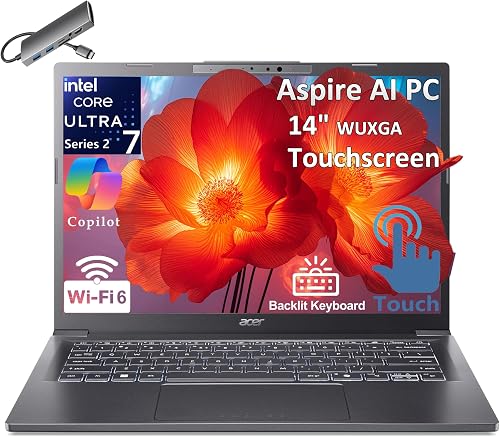
💰 Best Budget: Acer Aspire 14 AI
~$629NPU: 40 TOPS (AMD Ryzen 5 240) | Battery: Good
The most affordable Copilot+ certified laptop on this list. At under $650, you get the 40 TOPS minimum for full Windows AI features, 16GB RAM, and solid build quality. A genuine bargain for students and casual users.
View on Amazon →
🔋 Best Battery Life (Windows): HP OmniBook 5 14
~$799NPU: Intel Core Ultra (~40+ TOPS) | Battery: 28+ hours
In streaming battery drain tests, the HP OmniBook 5 14 outlasted both the MacBook Pro M4 and MacBook Air M4 — hitting over 28 hours. Remarkable for a Windows laptop at this price.
View on Amazon →Quick Comparison Table
Laptop NPU TOPS Developer Tooling Battery Best For Price MacBook Air M5 60+ Core ML / MLX 18–20 hrs Overall best ~$1,099 ASUS ROG Flow Z13 Ryzen AI Max+ Ryzen AI / DirectML Moderate AI power users ~$1,799+ ASUS Zenbook S16 50 TOPS Ryzen AI / DirectML Full day Creatives ~$1,299 Dell 14 Plus 47 TOPS OpenVINO / DirectML 20 hrs Business ~$1,199 ASUS Zenbook A14 45 TOPS Qualcomm AI Engine / DirectML 33 hrs Travel ~$1,099 HP OmniBook 5 14 40+ TOPS Qualcomm AI Engine / DirectML 28+ hrs Battery life ~$799 Acer Aspire 14 AI 40 TOPS Ryzen AI / DirectML Good Budget ~$629 Should You Buy Now or Wait? Laptop prices are expected to rise through 2026 due to DRAM and NAND shortages. If you see a good deal on a current‑gen Copilot+ PC, it may be worth buying sooner. That said, Windows 12 is expected to require 50+ TOPS for new AI features. Our recommendation: aim for 50+ TOPS and at least 32GB RAM for future‑proofing.
Frequently Asked Questions
